
Software license management has become a major issue for companies. Whether it’s for finance, human resources, sales, production, communication, or any other department, software is used in every department.
However, with the proliferation of license types, it is increasingly difficult to manage them efficiently. A strong software license management process helps organizations improve software license tracking, maintain a reliable software license inventory, reduce waste, and stay compliant with vendor terms. Here are 5 best practices to improve software license management.

Software license management at a glance
| Challenge | Best practice | Expected benefit |
|---|---|---|
| Poor visibility over software usage | Create a centralized software license inventory | Better tracking and fewer duplicate purchases |
| Risk of non-compliance | Review software license compliance regularly | Fewer audit and legal risks |
| Missed renewal dates | Centralize contracts and renewal data | Better planning and cost control |
| Too many unused tools | Remove outdated or unused applications | Lower software spend |
| Manual tracking in spreadsheets | Use software license management software | Faster reporting and better accuracy |
What is software license management?
Software license management refers to the process of tracking, organizing, and optimizing software licenses within your organization. It involves keeping an inventory of software, monitoring usage, managing renewals, and ensuring that licenses are used according to the terms and conditions established by software vendors.
Effective software license management enables organizations to optimize usage, reduce costs, and avoid legal and financial penalties associated with non-compliance. It also improves software license tracking, software license compliance, and overall software asset management across teams, devices, and locations, a particularly critical challenge for IT departments managing large and distributed software portfolios.
What a complete software license inventory should include:
- Software name and version
- License type and quantity
- Assigned user or device
- Purchase date and renewal date
- Vendor, contract owner, and cost
- Usage status and compliance notes
5 best practices for software license management
1. Conduct a software license inventory
One of the first steps in effective software license management is to conduct a thorough inventory of all software licenses within your organization.
This means creating a comprehensive list of all software applications, including version number, license type, terms of use, renewal date, and number of licenses purchased versus currently used. For stronger software license inventory management, you should also document who uses each license, which device it is assigned to, and whether the license is active, underused, or no longer needed.
By having a clear understanding of the software licenses in use, you can identify areas where licenses can be consolidated or optimized and ensure that you are not paying for licenses that are no longer used.
Software license inventory management can be done manually, but it is often more efficient to use specialized tools that can automatically track software licenses across multiple devices and platforms.
2. Verify software license compliance regularly
Once a software license inventory has been established, the next step is to verify that all licenses are being used in compliance with the terms and conditions set by software vendors.
This includes ensuring that the number of licenses in use does not exceed the number purchased and that licenses are being used on the appropriate number of devices and for the intended purpose. Regular software license compliance reviews also help identify expired agreements, inactive subscriptions, duplicate tools, and unauthorized installations before they become a bigger issue.
To verify conformity, you can conduct regular audits of your software licenses, either manually or using specialized software asset management tools. These audits can help identify discrepancies and enable organizations to take corrective action before they incur legal or financial penalties.
What to review during a software license audit:
- License count vs. actual usage
- Renewal and expiration dates
- Assigned users or devices
- Vendor terms and restrictions
- Unused or duplicate licenses

3. Centralize and track software license contracts and renewals
Another important tip for efficiently managing software licenses is to keep contracts and all associated documentation in one place. You should ensure that you have a copy of all license agreements, purchase records, terms and conditions, license codes, and activation information.
Centralizing this information makes software license tracking easier and helps teams manage renewals before deadlines are missed. It also improves visibility for finance, procurement, and IT teams that need access to the same data.
Keeping these contracts properly organized can help you meet compliance requirements, prove your right to use the software in case of an audit, and reduce the risk of losing important license information.
Recommended fields to centralize:
- Vendor name
- Contract start and end date
- Billing cycle
- Renewal owner
- Purchase proof
- License entitlement details
- Audit notes
4. Remove unused or outdated applications
Removing old applications that are no longer in use is an essential practice for effective software license management. Unused, duplicate, or outdated applications make software license tracking harder, increase software costs, and create unnecessary complexity for IT teams.
As applications age, they often become more expensive to support and maintain. They may also be incompatible with newer hardware and software environments, which can lead to migration issues and poor user experience.
Signs it’s time to remove a software application:
- No active users in the last 90 days
- Vendor no longer provides updates or support
- Replaced by a more recent tool already deployed
- License cost exceeds demonstrated value
By regularly removing outdated applications, you can optimize the use of your licenses, reduce unnecessary licensing expenses, and improve system performance. This is also an important part of software license optimization and cost control.
5. Use software license management software to automate tracking
Using a software asset management tool is one of the most recommended practices. These tools give you better visibility into your software inventory, help monitor license usage, and support compliance with license agreements.
A software license management tool or software license management system can help you track renewals, monitor expiration dates, improve reporting, and make better purchasing decisions. It also enables you to identify underused or overused licenses and reduce waste.
Such software allows you to centralize contract information and reduce the risk of non-compliance. For organizations managing multiple teams, remote users, or several locations, a cloud based software license management approach can also improve accessibility and reporting.
By automating the software asset management process, you can save time, improve data accuracy, and make software license tracking much easier.
Hector Software Asset Management and License Tracking (SAM)
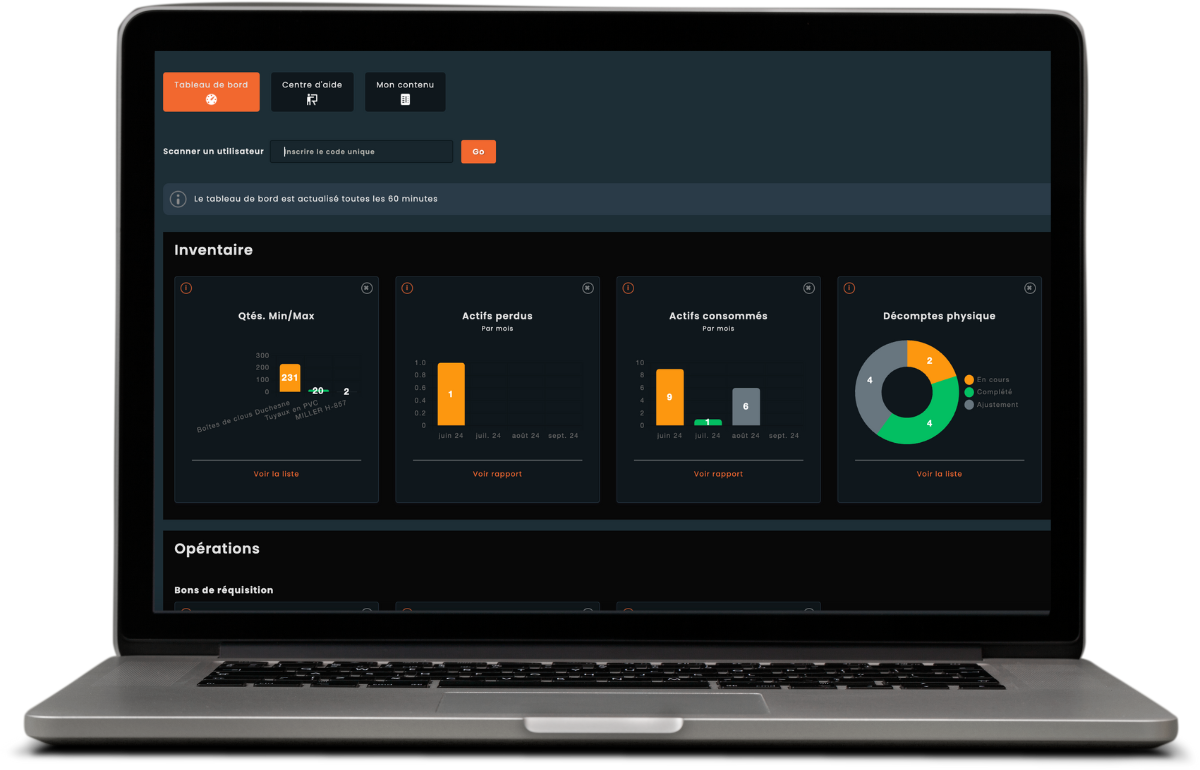
To optimize the use of your software, Hector offers a solution that allows you to manage software licenses from purchase to expiration. Hector supports software asset management, software license tracking, lifecycle visibility, compliance monitoring, reporting, reminders, and cost control.
- Software lifecycle tracking
- Software license tracking
- Usage reporting
- Cost tracking
- License assignment
- Audit compliance
- Automatic alerts and renewal reminders
15-days free trial
Hector at your company's service
Optimize your software asset management now
Increase the efficiency of your software asset management with our simple, economical, fast and effective solution.
FAQ - People often ask us these questions!
-
Poor software license management exposes organizations to several risks: non-compliance penalties from vendors during audits, overspending on unused or duplicate licenses, security vulnerabilities from unpatched or unsupported software, and loss of critical license data when contracts expire unnoticed. A structured process, backed by the right tooling, helps mitigate all of these risks proactively.
-
Software license compliance helps organizations reduce legal, financial, and operational risk. It ensures that software is used according to vendor terms and that license counts match actual usage.
-
A software license inventory should include the software name, version, vendor, license type, assigned user or device, purchase date, renewal date, quantity purchased, and current usage status.
-
Software license management focuses on licenses, renewals, and compliance, while software asset management covers the broader lifecycle of software assets, including usage, procurement, reporting, and optimization.
