
In the realm of modern business operations, efficient asset performance management stands as a cornerstone for success. Enterprises, regardless of their scale or sector, rely heavily on the effective oversight of their assets to optimize processes, minimize downtime, and bolster profitability. This is where Enterprise Asset Management (EAM) software emerges as a game-changer, offering comprehensive solutions tailored to streamline operations and enhance decision-making processes.
EAM meaning (definition): EAM stands for Enterprise Asset Management. An EAM system helps organizations track, manage, and optimize assets across their full lifecycle:from acquisition to maintenance, compliance, and retirement.
Demystifying Enterprise Asset Management (EAM)
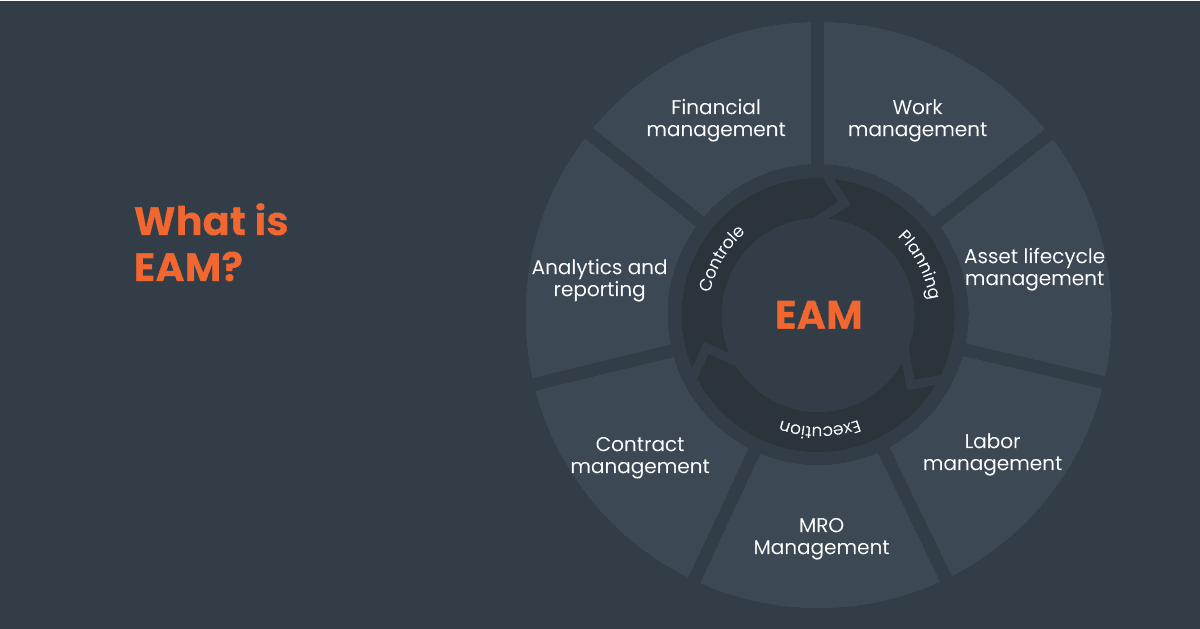
At its core, enterprise asset management software (EAM) revolves around the meticulous tracking and maintenance of an organization’s assets throughout their entire lifecycle. From critical machinery in manufacturing plants to essential equipment in healthcare facilities, EAM ensures that assets are utilized optimally, addressing issues such as asset maintenance, asset performance, and downtime mitigation.
Why EAM Matters:
An EAM software solution serves as the linchpin for organizations aiming to fortify their operational efficiency and resource utilization. By leveraging EAM solutions, companies can:
Maximize Asset Lifecycle
Through real-time monitoring and data-driven insights, EAM facilitates informed decision-making regarding asset replacement and maintenance, extending asset lifespan while minimizing operational disruptions. They enable businesses to embed risk management into their processes and better anticipate the timing of equipment updates and replacements.
Enhance Maintenance Strategies
EAM empowers enterprises to transition from reactive to proactive maintenance approaches, embracing preventive and predictive maintenance methodologies. By preemptively identifying potential issues, organizations can curtail downtime and optimize maintenance schedules.
Optimize Resource Allocation
By centralizing asset data and streamlining workflows, EAM enables efficient allocation of resources, reducing operational costs and enhancing overall productivity.
Workflow automation
EAM enables digital automation of key activities from commissioning to maintenance and decommissioning to increase efficiency and reduce errors.
What industries use EAM software?
Every industry can benefit from an EAM software, but some typically need asset management more than others :

IT Department (IT EAM / ITAM)
Typical assets: laptops, monitors, peripherals, software & licenses
Common EAM use cases: asset assignment, audit trails, refresh cycles, employee loans

Education
Typical assets: AV equipment, laptops, lab devices, classroom gear
Common EAM use cases: equipment loans/reservations, inventory audits, loss prevention

Construction
Typical assets: tools, heavy equipment, PPE, jobsite assets
Common EAM use cases: check-in/out, multi-site tracking, downtime reduction, preventive maintenance

Municipality (public assets)
Typical assets: PPE, shared equipment, rooms/resources, municipal inventory
Common EAM use cases: centralized tracking, accountability, reporting & audits

Healthcare (EAM for healthcare)
Typical assets: medical devices, supplies, clinical equipment
Common EAM use cases: expiry tracking, maintenance reminders, avoiding stockouts, audit-ready records

Your industry (custom workflows)
Typical assets: any asset portfolio
Common EAM use cases: custom fields, workflows, dashboards, roles/permissions
What are the main functions of an EAM software?
The main functions of an EAM software solution typically combine asset tracking, EAM maintenance, inventory control, reporting, and EAM system integrations (ERP/IoT), so teams can manage assets at scale.
| EAM capability (core step) | Asset lifecycle | What it does | Typical outputs / deliverables |
|---|---|---|---|
| Comprehensive asset tracking | Operate / Control | Tracks assets with complete profiles (descriptions, specs, procedures) and maintains a centralized inventory. | Asset register, asset profiles, status/location history |
| Complete asset lifecycle management | Acquire → Operate → Retire | Monitors the full asset lifecycle from acquisition to disposal, including maintenance schedules, follow-ups, and licenses. | Lifecycle timelines, asset history, audit trail |
| Streamlined maintenance management | Maintain / Optimize | Schedules and manages preventive, corrective, and predictive maintenance; automates workflows to reduce downtime. | Work orders, PM plans, maintenance history, downtime reports |
| Financial management integration | Plan / Acquire / Optimize | Integrates asset data with budgeting, expense tracking, and cost analysis; supports procurement decisions. | Budget views, TCO reports, capex/opex tracking, procurement insights |
| Regulatory compliance assurance | Control / Compliance | Ensures compliance using certifications/standards (e.g., ISO), documentation, licenses, and full traceability. | Compliance records, certificates, audit-ready documentation |
| Data analytics & reporting | Optimize | Uses real-time analytics to track performance, utilization, and maintenance KPIs; supports data-driven decisions. | Dashboards, KPI reports, utilization trends |
| ERP & IoT platform integrations | Operate / Maintain / Optimize | Connects to ERP + IoT for data sync, remote monitoring, and smarter predictive maintenance. | API/connector sync, sensor alerts, condition monitoring |
| Scalability & customization | All stages (enterprise scale) | Scales to large asset portfolios; custom fields, workflows, and dashboards aligned to business processes. | Configured workflows, role-based views, custom dashboards |
| User accessibility & mobility | Operate / Maintain | Access from desktop + mobile; supports collaboration and on-the-go maintenance execution. | Mobile work orders, field checklists, approvals |
| Cloud-based deployment | All stages | Cloud deployment for easier access, availability, and centralized data from anywhere. | Cloud access, centralized database, secure availability |
Implementing EAM: From Concept to Execution

Transitioning to an EAM system entails a strategic shift from manual asset management methods, such as inventory management with Excel, to automated technology-driven solutions.
Whether it’s replacing outdated inventory management practices or integrating disparate asset databases, the implementation of EAM software necessitates careful planning and seamless execution.
How to choose the best EAM software
The “best EAM software” depends on your asset complexity, compliance needs, and maintenance workflows. When comparing EAM solution providers, prioritize usability, reporting, integrations, and how easily the tool adapts to your asset types.
| Selection criteria | What to verify quickly |
|---|---|
| Ease of use | Can non-technical teams adopt it fast? |
| Asset types supported | Physical + IT assets, kits, multi-sites |
| Maintenance workflows | Preventive schedules, reminders, history |
| Reporting | Dashboards, exports, audit-ready trails |
| Integrations | ERP/IoT/SSO/API availability |
| Scalability | Roles, permissions, large asset volumes |
Key Steps in EAM Implementation:
- Assessment and Planning: Conduct a comprehensive evaluation of existing asset management processes and identify areas for improvement. Develop a tailored implementation strategy, aligning software functionalities with organizational objectives. Do you need to track virtual or physical assets? Maintenance costs? Asset life cycle? Asset location? Do you need a mobile app or QR codes to scan on-premises? Specific KPIs and metrics? This will help you choose a provider that fits your needs.
- Software Selection: Choose an EAM solution that encompasses critical features such as real-time asset tracking, preventive maintenance scheduling, and customizable dashboards. Ensure compatibility with existing IT infrastructure and user-friendly interface for seamless adoption.
- Training and Integration: Provide thorough training to employees and maintenance teams on the usage and functionalities of the selected EAM software. Integrate the new system with existing workflows and databases, fostering a cohesive asset management ecosystem.
- Continuous Evaluation: Regularly assess the performance of the EAM system, gathering feedback from users and stakeholders. Implement iterative improvements and updates to optimize system functionality and address evolving business needs.
EAM vs. CMMS: Unveiling the Key Distinctions
In the realm of asset management, two prominent solutions often emerge: Enterprise Asset Management (EAM) and Computerized Maintenance Management System (CMMS). While both aim to optimize asset performance and streamline maintenance work, they cater to distinct facets of asset management within organizations. Let’s delve deeper into the disparities between these two asset management solutions to gain a comprehensive understanding.
EAM vs CMMS : What’s the Key Distinctions ?
| Topic | EAM (Enterprise Asset Management) | CMMS (Maintenance Management) |
|---|---|---|
| Scope | Full asset lifecycle + finance/compliance | Maintenance operations focus |
| Best for | Enterprise-wide asset governance | Maintenance teams & work orders |
| Lifecycle | Acquisition → operation → retirement | Mostly operation & upkeep |
| Inventory | Often broader inventory & asset tracking | Spare parts / maintenance inventory |
| Integrations | ERP/IoT/enterprise stack | Often lighter integrations |
Want to know more about CMMS ?
Choosing the Right Solution:
When deciding between EAM and CMMS, organizations must consider their unique requirements, operational complexities, and long-term strategic objectives. While CMMS excels in operational maintenance management, EAM emerges as the preferred choice for enterprises seeking comprehensive asset optimization, strategic planning, performance management and compliance adherence across diverse asset portfolios.
While EAM and CMMS serve distinct purposes within the realm of asset management, their collective aim remains consistent: to enhance operational efficiency, minimize downtime, and maximize the value of organizational assets.
Hector: Your Trusted EAM Partner
Why choosing Hector ?
If you’re comparing Hector to a traditional “industrial” EAM (like SAP or IBM Maximo), it’s important to look at what Hector does exceptionally well.
Hector is a practical, cloud-based EAM solution built for teams that need fast adoption, clear asset accountability, and reliable tracking:without the complexity and cost of industrial EAM platforms.
Easy to use (fast adoption)
Traditional EAM systems like SAP or Maximo can require months of training and change management. Hector can be set up quickly and used confidently within hours.
Best-in-class check-in / check-out (asset lending & accountability)
Hector is perfect for organizations that frequently lend or move equipment. Instantly answer questions like: “Who borrowed camera #4?” are posible with its clear history.
Cost-effective vs. industrial EAM
Hector delivers the essential EAM benefits for a fraction of the cost of large, complex EAM suites. Ideal when you want asset control and visibility without enterprise-level overhead.
Strong for IT assets (ITAM-ready)
Hector handles IT-specific tracking that many industrial EAM tools don’t manage well:
- software licenses
- IP addresses
- employee assignments (who has what)
Try Hector : your EAM software
Hector is a cloud-based Enterprise Asset Management (EAM) solution that helps you track assets, manage maintenance workflows, and keep audit-ready documentation across the full asset lifecycle.
Frequently Asked Questions : EAM Software
Got questions about Enterprise Asset Management? Here are the answers to what organizations ask most before choosing and implementing an EAM solution.
What does EAM stand for?
EAM stands for Enterprise Asset Management. It refers to the tools, processes, and strategies used by organizations to track, manage, and optimize physical and digital assets across their entire lifecycle : from acquisition and deployment through maintenance, compliance, and eventual retirement.
An EAM system brings all asset data into a single platform so teams can make faster, better-informed decisions about maintenance, replacement, and resource allocation.
What industries use EAM software?
Virtually every asset-intensive industry can benefit from EAM software. The most common include:
- IT Departments: managing laptops, software licenses, and employee assignments
- Education: tracking AV equipment, lab devices, and classroom gear across campuses
- Construction: monitoring tools, PPE, and heavy equipment across multiple job sites
- Municipalities & Government: centralizing tracking of public assets, shared equipment, and facilities
- Healthcare: managing medical devices, tracking expiry dates, and maintaining compliance records
- Manufacturing, Oil & Gas, Aerospace, Energy: optimizing complex asset portfolios at scale
The common thread? Any organization that needs to know where its assets are, who’s using them, and when they need maintenance.
What are the key features of an EAM system?
A robust EAM system typically includes the following core capabilities:
- Asset tracking & inventory: real-time visibility of all assets, their location, status, and assigned user
- Full lifecycle management: from acquisition through disposal, with a complete audit trail
- Maintenance management: preventive, predictive, and corrective maintenance scheduling
- Financial integration: budgeting, depreciation, and cost tracking per asset
- Compliance & documentation: ISO certifications, license tracking, and audit-ready records
- Reporting & dashboards: customizable KPIs and real-time analytics
- Mobile access: field technicians can log work, scan barcodes, and check asset status from their phone
- ERP & IoT integrations: connecting asset data with broader business systems
The right mix of features depends on your industry, asset types, and operational needs.
Is Hector an EAM or a CMMS?
Hector is best described as a practical, cloud-based EAM solution : though it shares some features with CMMS platforms. Here’s where Hector fits:
- Like an EAM: Hector covers full asset lifecycle tracking, compliance documentation, financial visibility, multi-site management, and cross-department asset governance.
- Simpler than traditional industrial EAM: Unlike SAP or IBM Maximo, Hector is designed for fast adoption : teams can be up and running in hours, not months.
- Stronger than a basic CMMS: Hector goes beyond maintenance work orders to provide complete inventory control, IT asset management, equipment lending, and detailed audit trails.
Hector is the right choice for organizations that need real EAM capabilities : asset accountability, lifecycle tracking, compliance, and reporting : without the complexity and cost of industrial-grade platforms.