Purchase order software Restock before you run out
Create purchase orders from your low-stock alerts or from a requisition, keep all your suppliers in one place, and add purchased equipment directly to your inventory.
A purchase order is the document that formalizes a purchase from a supplier. It specifies which items are ordered, in what quantities, at what price and with which taxes.
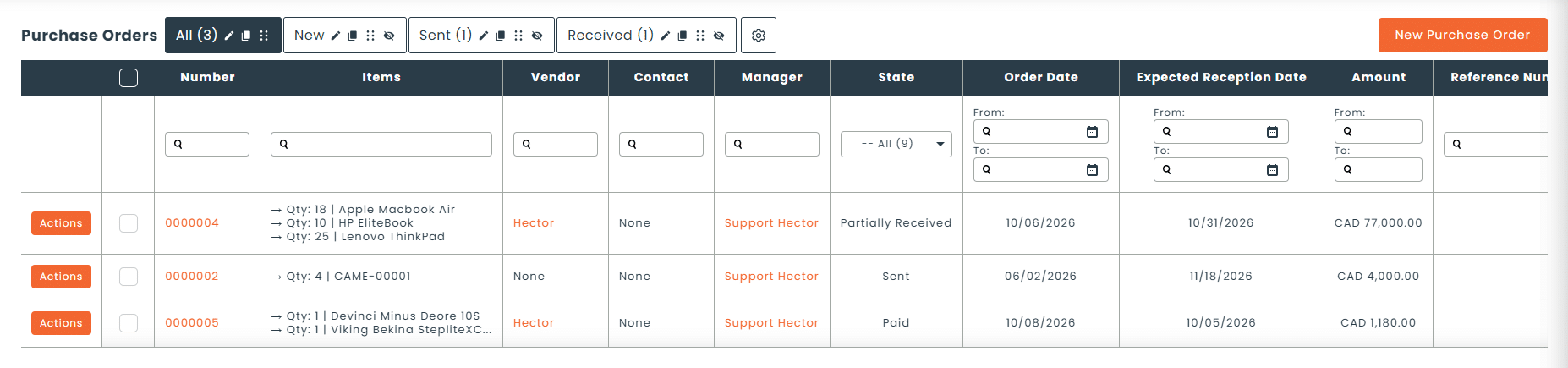
In Hector, purchase orders are part of the Operations module. You create a purchase order from a low-stock alert or a requisition, and the ordered items can become assets directly from the purchase order.
01 - Stock
Purchases triggered by your stock thresholds
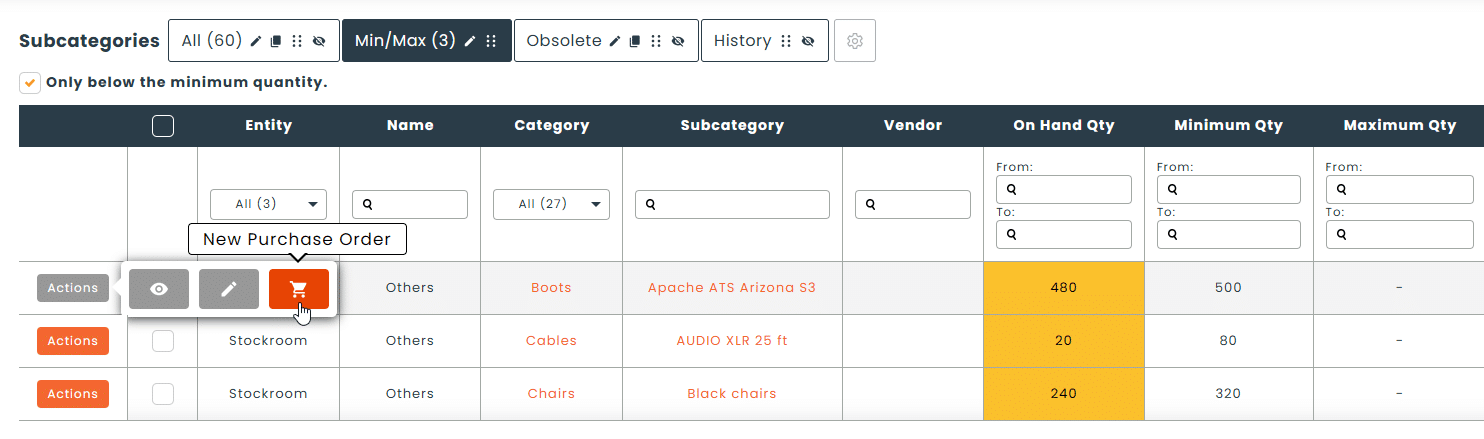
Set minimum quantities for your items. When a threshold is reached, Hector alerts you and you create the purchase order straight from the alert.
Minimum quantities per item
Low-stock alerts
Purchase order created from the alert
02 - Suppliers
All your suppliers in one place
Manage your suppliers directly in Hector and link each purchase order to the right supplier. Set up your taxes once and for all.
Supplier management
Configurable taxes
Purchase orders linked to requisitions
Custom notifications on purchase orders
03 - Inventory
Assets created directly from the purchase order
No more re-entering purchased equipment. Items on a purchase order become assets in your inventory, ready to be labeled and tracked.
Asset creation from the purchase order
No double entry
Inventory up to date as soon as equipment arrives
“Added to Inventory” report for your acquisitions
From low-stock alert to asset in inventory
A purchase order connects three steps that are often scattered across Excel, email and accounting software: the need, the purchase and the arrival in inventory.
How do purchase orders work in Hector?
1
Identify the need
The trigger is a low-stock alert or a requisition that can’t be fulfilled from stock.
2
Create the purchase order
Choose the supplier, the items and the quantities.
3
Apply taxes
Your configured taxes are applied to the purchase order.
4
Create the assets
The ordered equipment enters your inventory from the purchase order.
What types of purchases is it for?
Consumables, equipment or parts: purchase orders keep your purchases connected to your inventory.
Consumable restocking
Orders from a requisition
IT equipment
New equipment purchases
Spare parts for maintenance
Multi-site purchasing
Hector vs Excel
Why spreadsheets and email fall short
Criteria
Excel
Hector
Low-stock alerts
Purchase order created from a stock alert
Purchase order created from a requisition
Centralized suppliers
Taxes configured once and for all
Assets created from the purchase order, with no re-entry
Inventory linked to purchases
The Operations module, order by order
Purchase orders connect with your other operations. An approved requisition can trigger a purchase order, and the equipment received goes straight into your inventory.
Requisitions
Request equipment with approval, whatever the stock level.
It’s the purchasing document you send to a supplier, linked to your inventory. You create it from a low-stock alert or a requisition, and the ordered items can become assets directly from the purchase order.
Can I create a purchase order from a stock alert?
Yes. When an item reaches its minimum quantity, Hector alerts you and you create the purchase order straight from the alert. Minimum and maximum stock management is included in the Armor and Castle plans.
Can I add ordered equipment to inventory from the purchase order?
Yes. Items on a purchase order become assets in your inventory, directly from the purchase order, with no double entry.
How are taxes handled?
Taxes are configured in Hector’s settings and applied to your purchase orders. You set them up once, and they apply to every purchase.
How are purchase orders linked to requisitions?
When an approved requisition involves equipment that isn’t in stock, your staff creates a purchase order to restock. The request and the purchase stay linked.
Can I track the history of new acquisitions in a report?
Yes. The “Added to Inventory” report, under Reports › Inventory, shows the complete history of assets added to your fleet and can be exported. With report subscriptions, it’s sent to you automatically.