
Physical inventory & reconciliation
Simple, powerful inventory reconciliation software
Plan and run your physical asset counts, spot the gaps between real and recorded stock in real time,
and adjust your inventory in a few clicks.




What is inventory reconciliation?
Inventory reconciliation means comparing your recorded stock (what your software shows) with your real stock (what your teams physically count in the field), then correcting the gaps. It is the step that closes a physical inventory: without it, your database stays disconnected from reality.
Assets move, get lost, get forgotten. The physical count resets the record to give a faithful picture of your fleet and feed the audits of your finance and compliance teams. With Hector, you plan, count and adjust end to end, with no Excel export or double entry.
The benefits for your organization
A well-equipped physical count means a reliable inventory and a team that saves time.
Reset your inventory
The physical count realigns your data with reality, for a faithful picture of your fleet and a solid file for your financial or compliance audits.
Anticipate your budget needs
An accurate inventory lets you plan replacements and avoid costly emergency purchases. Measure your stock accuracy rate by category, location or organization.
Count any way you like: RFID, scan or paper
Your teams count from their phone with the Hector app, via a UHF RFID reader for ultra-fast passes over entire shelving units, or on a printable sheet. You choose and combine methods on a single count.
Steer in real time, from anywhere
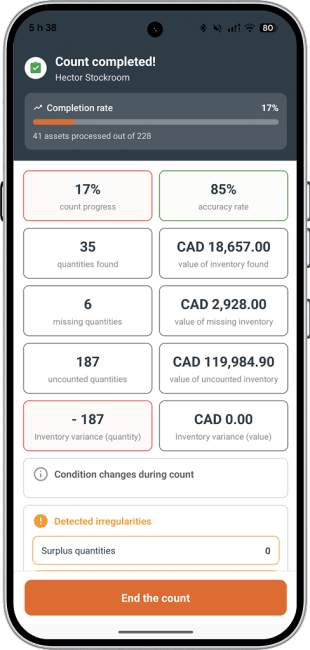
Track each counter’s progress, by location and category, without waiting for the count to finish. The Statistics tab shows a live dashboard: assets found, missing, surplus, accuracy rate and value of the gaps.
From planning to closing, Hector guides you at every step
01
Configure
Define the scope (store, department, counting team), choose blind mode, set the inclusion rules for assets on loan or off-site, and enable entity locking during the count if needed.
02
Count
Scan via the mobile app, an RFID reader, a USB barcode scanner, or enter quantities on a printed sheet. Every scan updates the line status in real time.
03
Adjust
Compare the gaps, accept or dispute each line, update the inventory in one click. Nothing is changed until you validate.
04
Report
Generate a summary report (assets found, missing, surplus, gap value, date and team) ready for your financial audits and budget reviews.
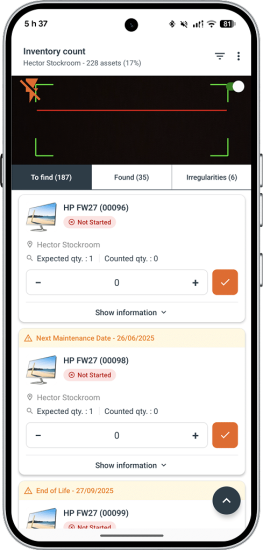
Count by scanning from your phone
The Hector mobile app guides your counters asset by asset: scan the QR code or barcode, enter the quantity, move to the next. A progress indicator keeps you located at all times.
For high-volume organizations, Hector also supports UHF RFID scanning: a single pass of the reader identifies all the assets on a shelving unit or in a room in seconds, with no need to handle each item. Every read feeds the current count, exactly like a barcode scan.
No network? Print a custom count sheet and enter the results when you get back. The three modes, mobile, RFID and paper, combine on a single count. Whatever the mode, the Progress tab gives the real-time status of each asset (found, partially found, surplus, not counted) by shelving unit, category or counter.
Adjust intelligently, line by line
After counting, Hector presents each gap for validation. Accept the matching lines, flag the ones to recount, mark the missing ones as lost. The inventory only updates once you validate.
For each line in gap, you choose the right action:
– Missing asset: do nothing, consume the missing quantity (archived as lost), or move the asset to another location if you know where it is.
– Partially found asset: same options, applied to the missing portion only.
– Surplus: create a new batch at the counted location, or rebalance to another batch or location.
For long lists, bulk editing applies the same action to several lines in a single save. All changes stay pending until your final validation: no production data is touched before you have approved each decision.
Reports for management and accounting
Once the count is closed, generate a complete summary report (assets counted, quantity gaps, value of the missing, date and team), ideal for your audits and budget reviews. Hector also offers specialized reports:
| Report | Content | Use |
|---|---|---|
| Gap detail | One line per exception: expected vs counted quantity, gap value, action applied | Basis of your audit file |
| Adjustment log | Chronological history of each change, with actor and timestamp | Traceability and compliance |
| Accuracy by category and location | Zones and asset families most prone to gaps | Prioritize the next counts |
| Accuracy trend over time | Change in stock record accuracy (SRA) from one count to the next | Management reporting |
| Dormant inventory | Assets not counted for a configurable number of days | Never leave a zone out of control |
Every report is exportable and can be automatically attached to the closing email sent to your stakeholders.
Software built for every industry
Hector adapts to your needs, whatever your industry.
Everything you need
Asset Tracking
Get an instant overview of all your hardware and software assets, with a flexible tool that adapts to your needs.
Equipment Loans
Automate equipment check-in and check-out, and keep clear track of your loans and rentals.
Mobile App
Access Hector anywhere: track your assets, scan your items and reserve equipment securely.
Report Generation
No more manual reports. Generate your inventories and equipment audits in just a few clicks.
Notifications & Reminders
Get alerted automatically whenever an action, an overdue return or a maintenance task needs your attention.
Data Security
Your sensitive information is protected and stored in a highly secure environment.
Barcodes & QR Codes
Generate and scan barcodes and QR codes to track your assets quickly and without errors.
RFID Inventory
Identify your assets by radio frequency (RFID): no more manual entry or time lost during inventory counts.
See more features
User Synchronization
Import your employees, students or clients so they can access Hector and act autonomously.
Single Sign-On (SSO)
Log in instantly with single sign-on, without re-entering your credentials every time.
Operations Module
Manage your daily activities: procurement, preparation, delivery and repair of your equipment.
Cloud Solution
Your inventory hosted in the Cloud, synced and accessible anytime, anywhere.
Inventory Reconciliation
Compare your physical inventory against your Hector data, spot discrepancies and make your stock reliable fast.
Iris Module
Link your QR codes to specific actions and trigger creation, movement or consumption in a single scan.
Accounting Module
Centralize invoices and payments in Hector: templates, documents and clear tracking of your transactions.
Transfer order
Move equipment between stockrooms and sites, with full traceability of every transfer.
Purchase Orders
Order from your suppliers, receive equipment and enter serial numbers right at receipt.
Requisitions
Let your users request equipment from a catalog and track each request until fulfilled.
Work Orders
Plan and track repairs on your equipment, from the initial request to completion.
Maintenance
Schedule preventive maintenance by subcategory or asset and get alerted before each due date.
Customization
Adapt fields, grids, email templates and printouts so Hector fits your processes.
Artificial Intelligence
Generate subcategory images, sort imported models and rename technical references into names your teams recognize.
Rental rate
Apply hourly, daily, weekly or monthly rates automatically to every loan, all the way to the invoice.
Your questions, answered
What is inventory reconciliation?
It is the step that compares recorded stock (the software data) with real stock (the physical count), then corrects the gaps to align your database with reality.
What is the difference between physical stock and recorded stock?
Recorded stock is the quantity your system shows; physical stock is what your teams actually count. The gap between the two reveals losses, entry errors, moves or theft.
Can you run an inventory with no network connection?
Yes. Print a custom count sheet from Hector, count offline, then enter the results when you get back.
Can you combine RFID, mobile scan and paper on a single inventory?
Yes. The three modes feed the same count; you choose the method best suited to each zone.
What is blind mode?
Blind mode hides the expected quantity from counters: they enter what they actually see, without being influenced, which makes the result more reliable.
Does Hector update the inventory automatically after counting?
No. No data is changed until you have validated each gap: you keep full control over the adjustments.